Web Hosting Support Area

- In Netscape Messenger click on "Edit" then Click on "Mail & Newsgroups Account Settings".
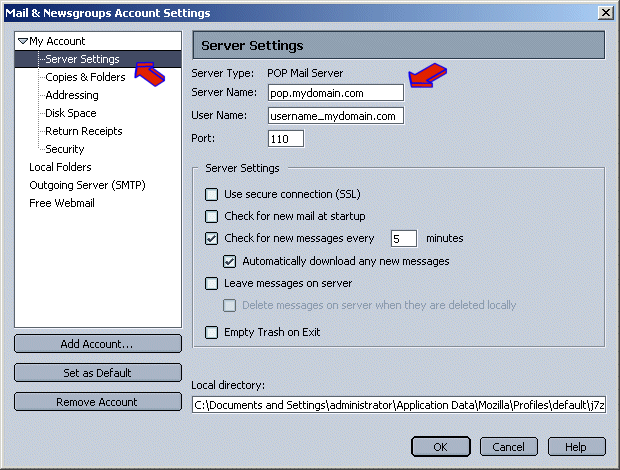
- On the Left under the "My Account" section Click on "Server Settings".
Modify the "Server Name:" field to read: mail.mydomain.com
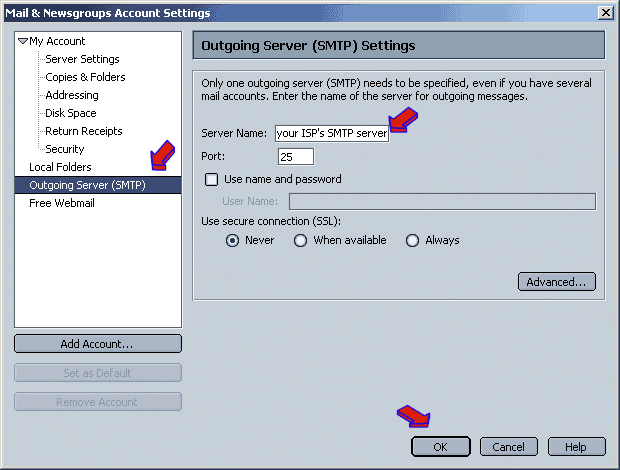
- On the Left Side of the Window, Click on "Outgoing Server (SMTP).
- On the Right side change "Server Name:" to the outgoing mail server of your ISP (for example: smtp.cox.net or smtp.bellsouth.net) or if your ISP does not provide an outgoing mail server, you may use smtp.yourdomain.com.
- To Finish Click on the "OK" button.
DONE
|
|