Web Hosting Support Area

- Click on "Tools".
- Then Click on "Options".
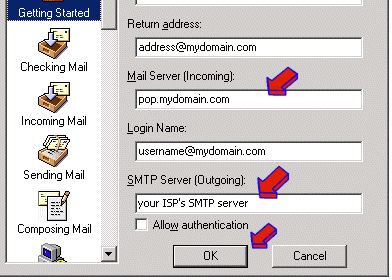
- Click on the "Getting Started" icon on the Left.
- Modify the "Mail Server (incoming):" field to read: pop.mydomain.com
- Modify the "SMTP Server (Outgoing):" field to the outgoing mail server of your ISP (for example: smtp.cox.net or smtp.bellsouth.net) or if your ISP does not provide an outgoing mail server, you may use smtp.yourdomain.com.
When you have verified (POP3) and (SMTP) fields are correct then click on the button labeled "Next"
- Click on the "OK" button.
|
|